ZP-001 · Windows 10/11 · GPL-3.0 · No account · No telemetry · Free

Side A · Track 01 · The library that is yours

Keep every song you ever loved.

Z Phase is a free, open-source offline music player for Windows. It plays MP3, FLAC and more from your own folders, reads the files already on your computer, works without internet, and never asks who you are. No subscription, no telemetry.

Z-Phase-Setup-2.3.1.exe · 180 MB · Windows 10/11 · free & open source

Z Phase logo
ZP-00133⅓ rpm → 592 songs

Z
Phase

music you own,
on a machine you own.

GPL-3.0 · WindowsStereo
MP3FLACM4AWAVOGGAAC10-band EQ14 presetsMini PlayerMedia keysZero telemetryMP3FLACM4AWAVOGGAAC10-band EQ14 presetsMini PlayerMedia keysZero telemetry

1Liner notes

A letter from the maker.

Please read it before you read the feature list.

Dear listener,

There is a song I used to play on every long bus ride. One day I opened the app and it was grey. Not available. I had listened to it a thousand times, and I had never owned it for a single second.

Meanwhile, on a drive in my own computer, sat years of music: songs I downloaded, albums friends handed me, tracks I sorted by hand into folders. It was a real collection. And no player treated it like one.

I wanted full control over my music library. No feed deciding what I hear. No subscription. No account. No internet. I wanted the polish of the apps I loved, with the files staying mine.

So I built Z Phase. Point it at a folder and your library appears, with covers, albums and artists, ready to play on a plane or a decade from now.

It is open source because a promise like “this is yours” should be something you can check.

— Piyushmaker of Z Phase
2Tour the app

This is the real thing. Poke at it.

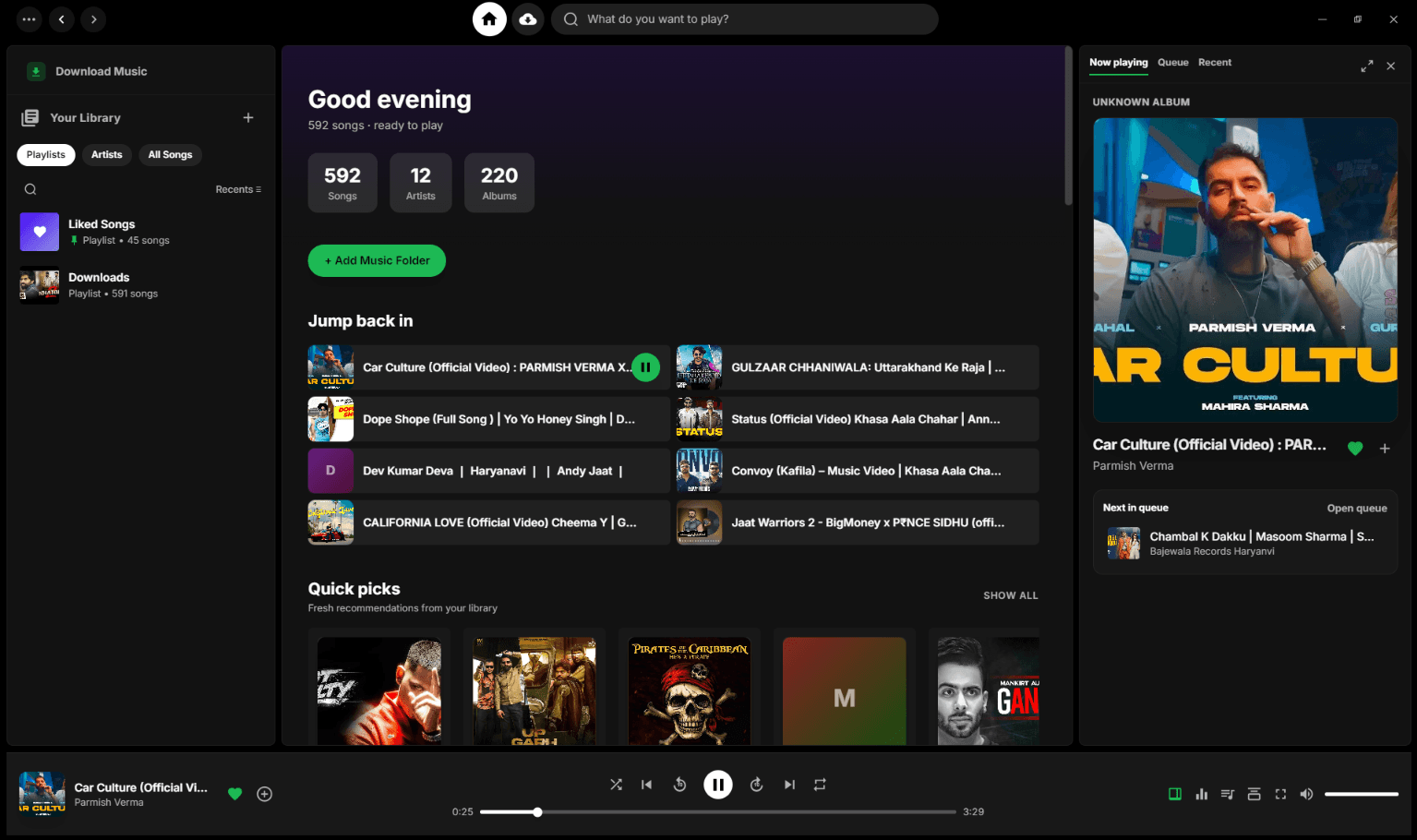
Real screenshots from a real library. Tap the numbered pins.

Z Phase home screen: library stats, Jump back in, Quick picks

← swipe the screenshot sideways →

Detail

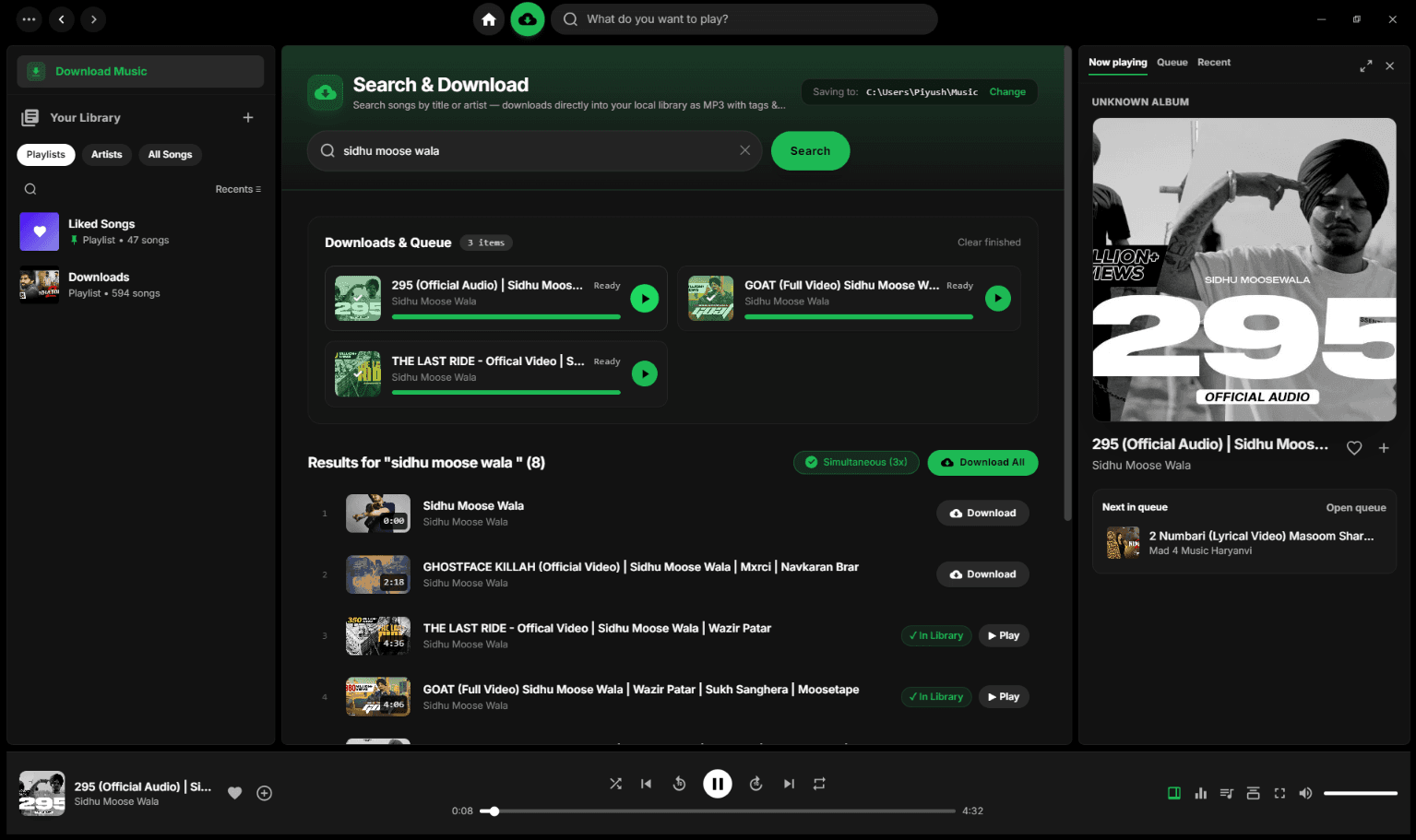
Download, finish, play. Then it is simply in your library.

Found tracks show an “In Library” badge so you never download the same song twice.

Z Phase download queue with Ready tracks and In Library badges

3The maths

Ten years later, what do you actually have?

A subscription is a lease on a library that can change its mind. Your files are the only copy that is truly yours.

Streaming Co.

monthly plan · illustrative

Plan × 120 mo₹199
Subtotal₹23,880
Songs you own0
TOTAL PAID₹23,880

“Some titles may leave.”

Z Phase

open source · forever

Licence₹0
Subscription₹0
Songs you ownall
TOTAL PAID₹0

Go buy an album instead.

Illustrative figure: 10 years at roughly ₹199/month, a typical music-streaming plan in India.

4Track listing

Everything on the record.

  1. 01

    Local library

    Scans MP3, FLAC, M4A, WAV, OGG and AAC into a fast SQLite index with artwork, year and genre read automatically. Edit any tag later.

    6 formats
  2. 02

    Playlists & likes

    Liked Songs, playlists with drag-to-reorder, Albums and Artists views, recently played, and a queue you can rearrange.

    ∞
  3. 03

    10-band equalizer

    Built on the Web Audio API. 14 presets, auto-detected “Custom”, a bypass switch for A/B listening, and it remembers across restarts.

    14 presets
  4. 04

    Search & download

    Search YouTube, save as MP3 with embedded artwork and tags through yt-dlp. Live speed and ETA. Optional, off the critical path.

    3× at once
  5. 05

    Playback engine

    Shuffle, repeat one/all, ±10 second skip, smooth switching, volume with mute.

    ±10 s
  6. 06

    Feels like Windows

    Frameless window, always-on-top Mini Player, tray, launch at startup, SMTC, Bluetooth and keyboard media keys, auto-updater.

    Win 10/11
  7. 07

    Privacy

    No accounts. No analytics. No telemetry. Your library never leaves your machine.

    0 bytes

Side B · Track 01

Put it on your machine.

  1. 1.Click Download. The latest installer starts downloading right away.
  2. 2.Run Z Phase-Setup.exe. It lands in your Start menu.
  3. 3.Click Add Folder and point it at your music.
  4. 4.Press play. That is all.
Download v2.3.1 (180 MB)

Having trouble downloading? Click here to download from Github

Heads up

Not code-signed (yet)

SmartScreen may warn you

Click More info → Run anyway. Rather not? The source is public, so build it yourself with npm run build.

5Credits

Built in the open, so you never have to take our word for it.

Shell
Electron
Interface
React + TypeScript
Styling
Tailwind CSS
Database
better-sqlite3
Metadata
music-metadata
Audio
HTML5 + Web Audio
Downloads
yt-dlp + ffmpeg
State
Zustand

# build it yourself

$ git clone https://github.com/PiyushBarala/zphase.git

$ cd zphase && npm install

# drop yt-dlp.exe + ffmpeg.exe in resources/bin/

$ npm run dev

$ npm run build

6Hidden track

Questions people ask.

What is the best free offline music player for Windows?+

Z Phase is a free, open-source offline music player for Windows 10 and 11. It plays your own MP3, FLAC, WAV, M4A, OGG and AAC files with no internet, no account and no subscription.

Is Z Phase a Spotify alternative for local music?+

Yes, if your music is on your computer. It has a familiar library, playlists, queue and now-playing view, but everything runs offline on your own files.

Is Z Phase really free?+

Yes. No ads, no premium tier, no account. It is GPL-3.0 licensed free software.

Does it collect any data?+

No telemetry at all. The only network traffic is what you start (downloads) and update checks on GitHub. See the privacy policy.

Which formats can it play?+

MP3, FLAC, M4A, WAV, OGG and AAC.

What about macOS and Linux?+

Windows only for now. Electron makes ports possible, and contributions are welcome.

Is downloading from YouTube legal?+

It depends on your country and the content, and you are responsible for respecting copyright. The feature is optional. Please support the artists you love. See terms.

Why does Windows warn me on install?+

The installer is not code-signed yet. Choose More info → Run anyway, or build from source.